

- Callaway Quantum Driver – The Ultimate ReviewPosted 3 days ago
- PowaKaddy Golf Bags 2026: Which One Belongs on Your Trolley?Posted 4 days ago
- Odyssey Square 2 Square Putters – The Best Zero Torque Ever?Posted 5 days ago
- Garmin J1 Junior Golf Watch – The Ultimate Junior GPS Golf WatchPosted 6 days ago
- Ping G440 K Driver: The Most Forgiving Driver of 2026?Posted 6 days ago
- Titleist SM11 Wedges – The Ultimate Guide for 2026Posted 6 days ago
- The Best Winter Golf Shoes – Top 5 for 2026Posted 6 days ago
- Is the Cobra OPTM Driver Worth £479? Our Honest ReviewPosted 1 week ago
- The Top 3 Nike Golf Shoes for 2026 – Awesome New RangePosted 1 week ago
- FootJoy Pulse Golf Shoes – The Best Golf Shoe of 2026?Posted 1 week ago
TaylorMade SIM Tuning Guide
TaylorMade SIM Tuning Guide, How To Tune Up The TaylorMade SIM Driver & Fairway Wood!

This TaylorMade SIM Tuning Guide will give you the advice and help to explain how you can fine-tune the latest SIM Driver and Fairway wood to suit your game. Information courtesy of TaylorMade and the experts themselves, brought to you by us at The Golf Shop Online!
Fuelled by a history of innovation and breakthrough technologies, the next generation of metalwoods from TaylorMade Golf has once again pushed the boundaries of design and performance. With the introduction of the 2020 SIM family, TaylorMade have literally reshaped the way you look at driver technology.
A powerful new asymmetric sole shape is engineered to increase clubhead speed and reduce drag through improved aerodynamics at the most critical stage of the swing. From the company that brought you movable weight technology, non-traditional crown colouring for advanced optics and alignment, and the first-ever metalwood in 1979, TaylorMade have again disrupted the conventional driver design. With SIM, SIM Max and SIM Max•D, the new shape of performance has arrived in golf!
Adjusting SIM
Adjusting the SIM family is simple with the TaylorMade torque wrench. Use the wrench to loosen the screw in the centre of each weight, then slide the weight to the desired location and lock it in place by tightening the screw until you hear an audible “click” noise from the wrench. 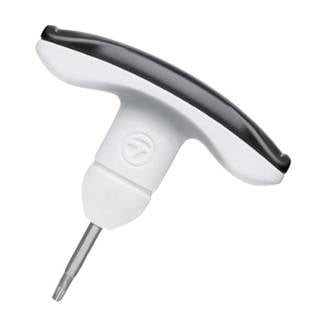
To adjust the Loft Sleeve, loosen the screw in the heel until the clubhead releases from the shaft.
Align the desired loft as marked on the sleeve with the line on the back of the hosel and tighten the screw until you hear an audible “click” noise.
Step 1: Loft, Lie & Face Angle Adjustment
The SIM, SIM Max, SIM Max D, and SIM Ti Fairway feature a 4-degree Loft SleeveTM which allows for adjustment of loft, lie and face angle.
There are 12 possible positions to fine-tune your ball flight. The image below shows all 12 positions and what each will provide to the club. 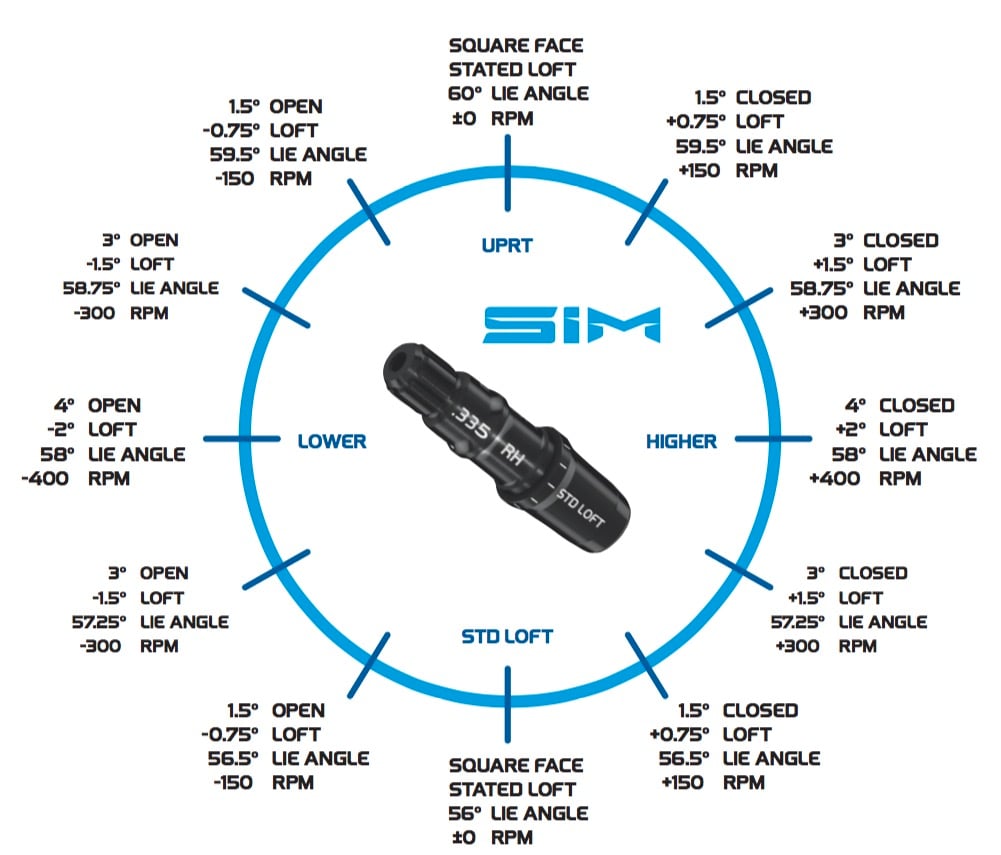
EACH CLICK OF THE SLEEVE
- Movement increases or decreases loft 0.5o – 0.75°, lie angle 0.5o – 0.75°, face angle 1.0o – 2.0°
Step 2: Ball Flight Control Adjustment, Moveable Weight Track System
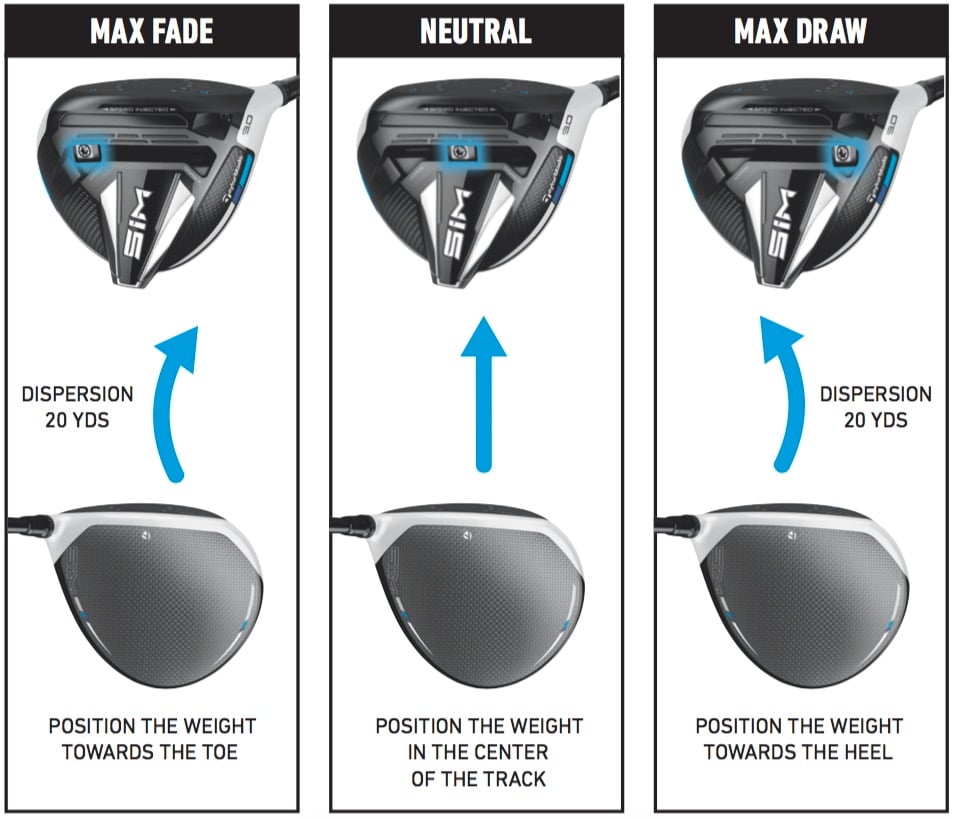
The SIM Driver is unique because of the Movable Weight Track System. The single, 10g weight enables the player to create their preferred shot shape. The Moveable Weight track System only features in the SIM Driver and not the SIM MAX.
The Image below shows you what happens to the club and the desired shot shape it will bring when you move the weight along the track.
The TaylorMade SIM Driver is available for purchase from The Golf Shop Online, offering complete custom options. Our friendly, supportive PGA-trained sales and customer service team is on hand to provide you with expert advice, helping you make a more informed decision when purchasing the latest TaylorMade products.

Related Posts




-
 Callaway Quantum Driver – The Ultimate Review
Quick Verdict The Callaway Quantum driver range represents their...
- January 23, 2026
-
 PowaKaddy Golf Bags 2026: Which One Belongs on Your Trolley?
Quick Verdict on the New Range of PowaKaddy Golf...
- January 22, 2026
-
 Odyssey Square 2 Square Putters – The Best Zero Torque Ever?
Quick Verdict on the Odyssey Square 2 Square Putters...
- January 21, 2026
-
 Understanding the Ping Colour Chart & Dot System
Ping Colour Chart – can you understand it? Are...
- December 2, 2025
-
 Ping Grip Sizes – How to Choose The Correct Golf Grip
If you have read our blog on choosing the...
- December 9, 2025
-
 Can I custom fit Ping Golf Clubs online?
A frequent question our golf professionals get while speaking...
- November 9, 2020

![X [Twitter]](https://www.thegolfshoponline.co.uk/assets/themes/gso2022/images/footer/icon-x.png)


2 Comments